Knowledge base Code
Working in a git repository
Pro can work inside one of your repositories the way a coding agent does — reading your actual files, and with writes on, changing them.
Connecting a repository
?git, or the Git chip in the toolbar, connects a provider:
GitHub, GitLab, or Gitea/Forgejo — which covers Codeberg and self-hosted instances. It
takes a scoped personal access token, a repository and a branch. A repository that
announces itself on Nostr can be pasted in as its address instead.
You do not have to type the repository's name. Paste the token and choose List what this token can reach: Nymbot asks the forge what that token can see and shows the answer as a list you check. Checking connects each one with its default branch already filled in, and puts them all in this chat. Anything already connected is shown as such rather than offered a second time. That request goes from your device straight to the forge — not through the Nymbot worker — so the token does not travel anywhere it does not already go. A self-hosted forge that refuses cross-origin requests simply cannot be listed; type the repository in by hand and everything else works the same.
Once connected, the chip shows the repository name, and messages sent with a
Pro model selected run in that repository's context.
?git disconnect removes it. Disconnect in the repository list
forgets the token but keeps the repository there, marked as having no token, so you can add
a new one later.
Repositories announced on Nostr
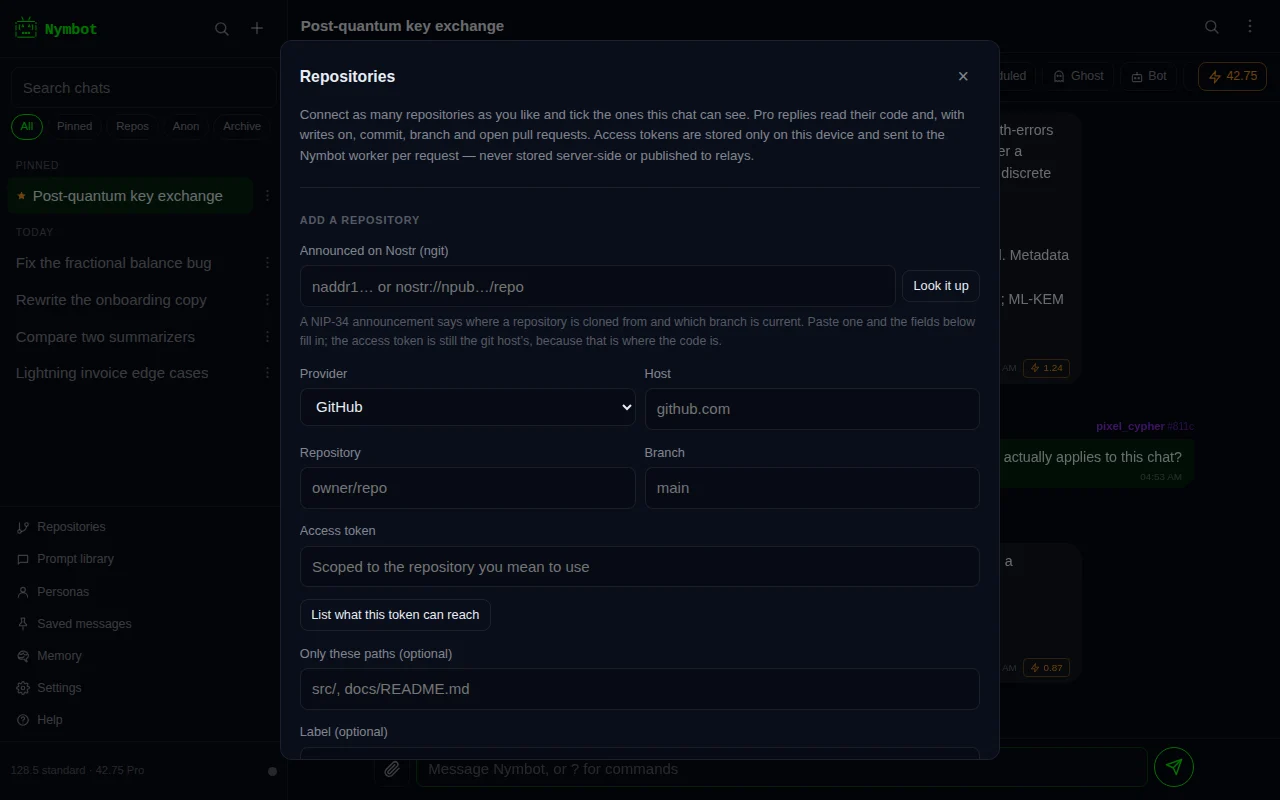
Some repositories announce themselves on Nostr rather than only on a forge, using NIP-34 — the protocol behind ngit and gitworkshop. The announcement is a Nostr event carrying the project’s name, its maintainers, the relays that collect its patches and issues, and the URLs it can be cloned from. A second event says where each branch currently points.
Paste an naddr or a nostr:// address into the repository form and
press Look it up. Nymbot reads the announcement off the relays and fills the
form in: the git host it is cloned from, the repository there, and the branch the project
itself says is current. You still add a token for that host, because Nostr carries the
announcement and the git server carries the code.
Which means the rule is simply where it is cloned from. A repository whose clone URL is on
GitHub, GitLab, Gitea or Forgejo — self-hosted included — is one Nymbot can read.
One cloned only over git:// or ssh has no HTTP API to read files through, and
Nymbot says so rather than half-connecting. Where the host is self-hosted the provider is a
guess from its name, and you can correct it before saving.
A repository added this way is badged ngit in the list, and replies call it by the name it announces rather than by its path on the mirror.
What it can do
A message in repo context runs as a small agent rather than a single completion. The model can list directories, read files and search the tree, then answer using what it actually found — so "why does the retry loop give up early" is answered from your code, not from a guess about code that looks like yours.
It sees the branch you connected, at its current head.
With server runs turned on for the chat, it can also ask to run a command against your code, such as the tests, on a Nymbot server. Every run waits for you to allow it.
Turning writes on
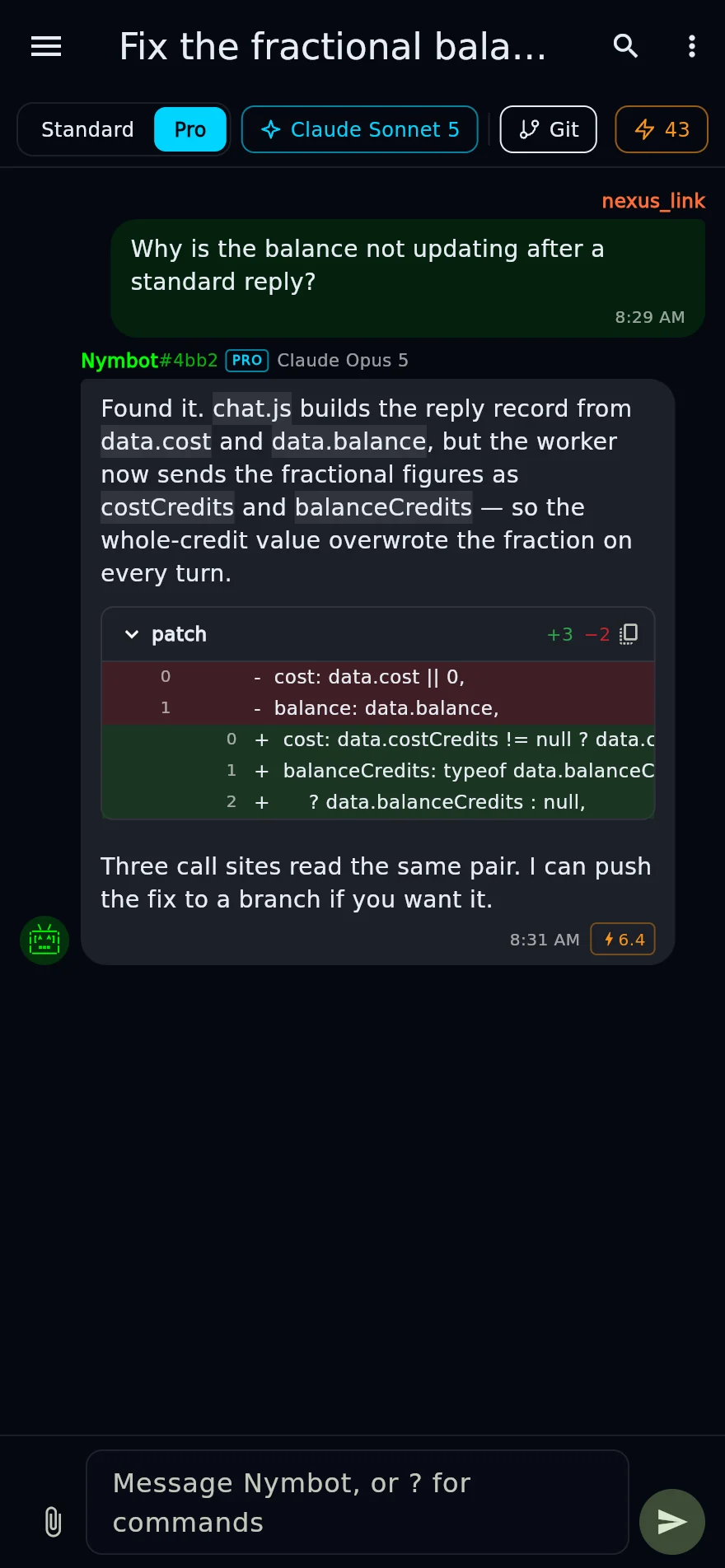
?git writes on adds the ability to commit files, create branches and open pull
or merge requests. Off by default, and worth leaving off until you want it.
With writes on, ask for a change and you get a branch and a pull request to review rather than a patch pasted into chat: each task works on a branch of its own. Nothing is pushed to your default branch unless you turn that off, that is the branch you connected, and you asked for it.
A run's edits go in as one commit per repository, at the end of the run or when the model decides a piece of work is done. If you would rather see them first, turn on Ask before committing for that repository. The run then holds its changes back, the reply shows them as a diff, and Apply commits them while Discard throws them away. Applying costs nothing.
A branch for each task
With Each task gets its own branch on, which it is for every repository
unless you turn it off, a task that writes commits to a branch of its own, named
nymbot/ and a short id. Nymbot makes it from the head of the working branch
when the task makes its first commit, so a task that only reads makes no branch at all.
The working branch itself is not touched, which is why several tasks can write to the same
repository at once instead of waiting their turn.
When the task is done, Nymbot does what When done says. Open a pull request is the default; Offer a merge leaves a Merge button on the reply; Leave the branch does nothing more. The default is set in Settings, under When a task’s branch is done, and each repository can choose differently in its own form. If the forge has no API for pull requests Nymbot can use, or it refuses one, the branch is left as it is and the reply says so.
The reply shows the branch with Open PR, Merge and Delete, and the Tasks pane lists it with the task. While the task is still running, its card, the Tasks pane and the list of what is running name the branch as soon as it exists, on every device signed in to the account. A task that is stopped or fails part-way still hands its branch back, so it can be merged, deleted or cleaned up like any other. A merge is a merge commit through the forge’s own pull request, pinned to the commit Nymbot recorded, so new commits pushed there in the meantime are never merged unseen. Nothing is ever force-pushed. If the branch conflicts with the working branch, the reply offers Open the PR to resolve or Ask Nymbot to update the branch, which merges the working branch into it with a merge commit rather than rebasing. GitHub and Gitea or Forgejo can do that; GitLab has no API for it, so there you resolve it in the merge request.
Changes to CI and workflow files still wait for your review, exactly as they do without a branch of their own.
Your device remembers the nymbot/ branches this account made. The next task
on that repository, or Clean up Nymbot branches in the repository list,
deletes the ones whose pull request is merged or closed, or that are seven days old with
nothing left to merge. A branch is only deleted if it still ends at the commit Nymbot
recorded, so one somebody has pushed to since is left alone, and no other branch is ever
touched. It runs from your device with the token it already sends; the server keeps no
token to do it later.
Turn the option off to commit straight to the working branch. A task then has the repository to itself, and a second one on the same branch only reads it until the first has finished. Older versions of the app work that way too.
Undoing what a run changed
A reply that wrote to your repository says what it touched: the repository, the branch, and every file. Undo these changes puts them back — each of those paths is read at the commit the branch stood on before the run and committed as it was. A task that worked on a branch of its own left the working branch alone, so there is nothing there to put back: Delete removes its branch instead.
That is a revert, not a rewrite. Nothing is erased and no history is rewritten: what Nymbot did stays in the log, it is simply no longer the state of the branch. Anyone who pulled in between keeps a checkout that still works.
It costs nothing. Undoing touches no model, so it spends no credits — the access token travels with that one request the way it does with every other, and nothing about the checkpoint is stored anywhere but your own device.
A branch or pull request the run opened is listed and left where it is. Closing somebody's pull request on their behalf is not an undo, and deleting a branch other people may have fetched is not either — do those yourself if you want them gone.
What a repo task costs
A repo task uses up to six model calls per message — look, read, search, answer — each billed at the pinned model's Pro price. Only the calls actually used are charged, so a question answered from one file costs about what an ordinary reply costs.
The app reports the total and the number of calls after each repo task.
When a task runs out of room
A repository task is a loop, not a single answer: the model lists a directory, reads a file, searches the tree, reads another, and only then writes. That loop has an allowance — a number of model calls the reply reserved credits for — because an unbounded agent is an unbounded bill.
When a task uses its allowance with work still to do, Nymbot stops, gives you what it has, and says so. Nothing further is charged.
You can also let it carry on. Set a continuation budget in Settings and Nymbot buys another allowance from the same balance when a task runs out, picking up exactly where it stopped rather than re-reading the repository from the beginning. It goes one leg at a time, each leg saying what it cost, and stops the moment the budget is spent, the task is finished, or you press Stop. Choosing “until my balance runs out” is still a ceiling — it is your balance rather than a number you typed.
The default is to stop and tell you. Nothing continues, and nothing is spent beyond the reply you asked for, unless you have set a budget.
Normally your device sends each leg, so a task only carries on while the app is open. With background runs turned on, the server sends the next legs itself while the app is closed, within the same budget, at most 40 legs and 6 hours, and tells you once when the task is done. To do that it keeps the repository token sealed with a key only it holds while the task is working, and deletes it when the task ends and always within 6 hours. A background task writes to its own branch like any other task.
About that token
The access token is kept on your devices and syncs between them inside your end-to-end encrypted settings, so the server holds only a sealed copy it cannot read. It is wiped by a device wipe, travels to the Nymbot worker with each request, and is never stored readable server-side or published to relays. The only time the server keeps it is sealed, while a background run you turned on is working, for at most 6 hours. Scope it to the one repository you mean to use, and revoke it at your provider when you are done.
Because it syncs, a chat that uses the repository works on every device you sign in on without connecting it again. Disconnecting the repository on one device clears the token on the others too. The token never enters a server run's container.