Knowledge base Chatting
Conversations
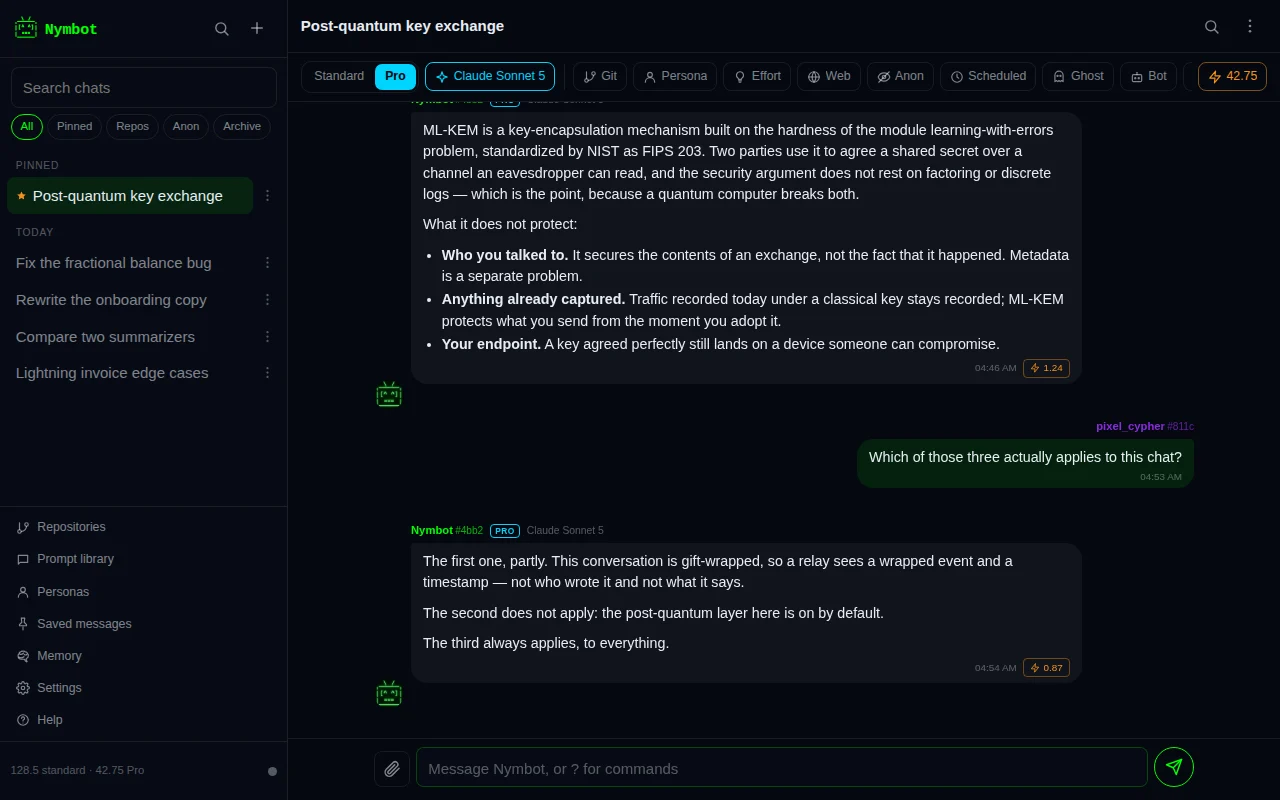
You can keep as many separate chats with Nymbot as you like. Each one is its own thread, its own context and its own title.
Each chat is its own thread
Press New chat and you get an empty conversation. Nothing said in one chat is visible to the model in another — a debugging session and a recipe do not bleed into each other, and the older one costs you nothing while it sits there.
Every chat is a private message thread in its own right: the messages are gift-wrapped individually, published to relays, and reassembled on whichever device you sign in from. Sign in on a second device and the whole list is there.
The list is sorted by most recent activity. Search filters it by title and by the text of the messages inside, which is possible only because the decryption happens on your device — the search never leaves it.
Where the titles come from
A new chat is called New chat until you say something. The first message you send becomes its name: the app takes that message, trims it to a short phrase, and puts it in the header and in the sidebar.
Two things follow from that. A conversation that starts "why does this regex backtrack" is findable a week later, and the title is chosen entirely on your device — the server is not asked to summarize anything, and the title only ever leaves your device encrypted to your own key, for your other devices.
Rename any chat from its header menu if the first thing you asked turned out not to be what the conversation became about. The same menu is on every row in the sidebar, behind the … button, and it acts on that row's chat: renaming, pinning, archiving, exporting or deleting one from the list leaves you reading the one you were already reading.
What Nymbot remembers
Inside one conversation, the model sees the turns that came before it, so follow-up questions work without repeating yourself. The thread is reconstructed from the encrypted messages themselves each turn; there is no plaintext transcript sitting anywhere.
Older turns fall out of context as the conversation grows — the model is given the most recent stretch of it, not the whole history. What decides how much is a budget rather than a fixed number of messages, so a handful of long turns get the room they need instead of each being clipped to the same short length. A turn that had to be trimmed says so, rather than arriving as a fragment that reads like the whole thing. If an answer starts drifting from something you established near the top, restate it or start a fresh chat.
What does not fall out is your standing context: custom instructions, the repositories in scope, and the parts of a workspace that bear on what you just asked. Those ride every message, so they still apply on turn fifty.
Asking a question differently
Ask this differently under any message you sent reopens it for editing. What happens next is your choice, and the box is checked by default: the chat you had stays exactly as it is and the new answer arrives on a branch.
The branch carries everything said before the question you changed, along with the whole standing setup — repositories, persona, workspace, bot, model, effort — and the artifacts those earlier messages produced. It runs on a thread of its own, so the two conversations do not see each other.
Uncheck the box and it rewrites in place instead, which throws away everything said after that message. That was the only behavior once, and it is still there when you want it — but it is no longer what happens by default, because nothing about it could be undone.
The branch also starts from Nymbot's own record of the conversation up to the message you changed, so the model has the same context it had the first time.
Branch from here under a reply does the same thing without changing anything: a copy of the chat up to that point, to take somewhere else.
Several requests at once
You do not have to wait for a reply before asking the next thing. Every message you send starts its own run straight away, in the same chat or in another one, and nothing waits in a queue. Each reply, each continuation, each approval card and any error lands directly under the message that asked for it, so answers that finish out of order still read in order.
While a request runs, a card under it shows what it is doing and, for longer work, its plan. The card has its own Stop, which cancels that request on the server as well as on your device, so it stops at its next step and only what it used is charged; the chat then shows Stopped. under the question. The Stop in the composer stops every request in the chat at once. Add instructions on the card passes a note to the request while it works: it is picked up at the next step and does not change what the request may spend. If the request has already finished, the app offers to send your note as a new message instead. A new message in the same chat also knows what is still running, so “for that research, also cover pricing” is passed on to it.
Up to 3 requests run at once across all your chats. Change that under Requests at once in Settings, up to 10; every running request holds its own credits until it finishes. A request past the limit waits under its message, marked Waiting for a free slot, and goes when one finishes. If the server turns one away because too many are running on your account, the message says so and offers Start anyway, Always allow up to one more, or Wait. The free daily replies run one at a time; credits lift that.
Running now, in the menu, lists every request still running on any of your devices, with the chat it belongs to, so you can open, stop or add instructions to one started on your phone from your computer. A reply that takes longer than the connection lasts is not lost: the app keeps checking for it and shows it in its place, and trying again never charges twice for the same message.
Requests in anonymous chats are left out of Running now and Tasks on your other devices: each one runs under its chat's throwaway key, and asking about them with your nym would link the two. The device you are on asks about the anonymous chat you have open, with that chat's own key, in a request of its own.
Messages written while you are offline stay in the chat marked Waiting for connection, where you can edit or delete them, and are sent in order, each as its own request, as soon as you are back online.
Commands cost nothing and happen instantly, so ?balance or ?model
run right away and never start a request.
Letting a task carry on without the app
A long task, such as work in a repository, deep research or a team of models, runs in steps. By default your device sends each next step, so the task only moves while the app is open. If you turn on Carry on in the background in Settings (off until you choose it), a task that runs out of room is handed to the server instead, which sends the next steps itself while your app is closed and tells you once when it is done, needs your approval, pauses or fails.
- It only applies to paid requests, never to the free daily replies or to anonymous chats.
- It is bounded: at most 40 steps, at most 6 hours, and no more than the credits you allowed for carrying tasks on. Each step holds its own credits and is charged on what it used. If your balance runs out or a limit is reached, the task pauses with everything so far saved, and you can carry it on from the app.
- Stop and Add instructions work exactly as for a request running on your device, from any of your devices.
- A step that needs your approval pauses the task and notifies you; your standing permissions decide what may run unattended.
- Each step's reply is published to the relays encrypted to you and kept for 24 hours after the task's 6-hour window, so any of your devices picks it up when it opens.
What it changes is set out in what the server sees: to send the next step, the server keeps the task's saved state and the settings that step needs, including repository and connector tokens, sealed with a key only it holds, and deletes them when the task ends and always within 6 hours.
Scheduled prompts
A scheduled prompt asks Nymbot something at a set time, once or every hour, day or week. Normally schedules live on your device and fire while the app is open. You can also let a schedule run on the server, so it fires while the app is closed. That is opt-in twice: once in Settings, and once for each schedule.
- Notify me instead of running, offered first, is the most private choice: the server keeps only the due time and where to send the notification, and the app runs the prompt when you open it.
- Run on the server keeps a copy of the prompt, its title, when it repeats, which chat it answers in, the model and the credit limits, sealed with a key only the server holds. The server can read the prompt when it runs it, the same as any message you send. It never keeps your chat history, repositories, connectors or memories for it, and each run starts without the chat's history.
- Each run is paid from your balance, never from the free daily replies, and is capped per run, per day and by a daily credit limit across all your schedules (50 unless you set another). At most 10 schedules can run on the server, at most once an hour each.
- The permission lasts up to 90 days; saving the schedule again renews it. Three failed runs in a row turn a schedule off and tell you.
- Deleting the schedule, turning the option off, clearing your history or wiping the app deletes the server copy at once.
- Server schedules aren't available in anonymous chats: a schedule that answers in one runs on your device, and the server refuses to run a schedule in a thread another key holds.
What carries between chats
Inside one chat, the model sees the chat. Between chats, what carries is memory: standing facts about how you work — what to call you, what you build, how you want answers written.
They are kept one entry at a time rather than as a rolling summary, because a summary cannot be argued with. Open Memory in the sidebar and you get a list you can read line by line: correct the one that is wrong, throw away the one you never meant to save, and write in the ones you would rather not wait to be noticed.
Facts you mention in passing are noticed as you chat, from a deliberately narrow set of
patterns that only fire on sentences explicitly about you and explicitly in the present
— a question is never one. Anything saved this way says so at the time, with one tap
to take it back. Turn the noticing off in that panel and ?remember still works.
A memory saved while you are in a workspace belongs to that workspace, so a fact about one project does not follow you into another. A memory saved outside one holds everywhere.
They live on this device and are searched here, the same way knowledge files are: the few that bear on a question travel inside that message. Your name and anything you asked about how to answer ride every message, since those apply whatever you are asking about.
A ghost chat neither reads memory nor adds to it. It is not part of a record, and memory is a record. Neither does an anonymous chat: facts about you would tie its throwaway key to your nym.
Reading back what fell out
Turns the window could not hold are still listed for the model, one line each, so it knows what it is missing rather than answering from the half of the conversation it happens to have. A Pro reply can then read any of them back in full before it answers.
Those turns are decrypted for the request anyway and were being discarded, so reading one back costs no second trip to the relays and nothing is stored to make it possible. What it does cost is one more model call, charged on the tokens it uses — on the replies that actually look something up, and not on the ones that do not.
A long conversation sent whole would cost more on every single reply, forever, and the price would rise the longer the chat stayed useful. That is the pricing that makes people start a new chat to save money and throw away the context they were paying for. What a reply costs here tracks what the question needed, not how long you have been talking.
Begin a message with ! to send it with no history at all: a one-off question
inside an existing conversation, without the thread's context coloring the answer or
inflating the prompt. It stays out of the thread afterward too, so the tangent you asked to
keep out does not color the next answer either. It remains in the chat where you can read
it — what changes is only what the model is shown next time.
Writing your message
What you send is markdown, the same as what comes back. A fenced block renders as a block, a backticked word as code, a list as a list — so pasting a snippet into a question reads as a snippet rather than as a wall of backticks.
With the composer focused, Ctrl/Cmd+B, Ctrl/Cmd+I and
Ctrl/Cmd+E wrap what you have selected in bold, italic or code, and
Ctrl/Cmd+Shift+E opens a fenced block on its own lines. Pressing the same one
again on text that already carries the marks takes them off.
Paste something long — a log, a file, a stack trace — and it goes in as an attachment instead of filling the composer, measured in lines rather than bytes. The question you are asking about it stays readable, and it reaches the model fenced as a block. A short paste is left where you put it.
Sending pictures
Attach a picture from your device, or put an image link in your message, and ask about it. The worker hands the pictures to the model alongside the question, so "what is wrong with this diagram?" with the diagram attached works as one message.
Every Claude, GPT, Gemini, Grok and Kimi Pro model can see images, as can the creative and translation routes on the standard tier. A vision reply costs what that model's reply would have cost — there is no separate charge for looking.
An attached picture is uploaded to a public media host so the model can look at it. The upload goes through the Nymbot worker, which keeps your address off the host, and it is signed with a throwaway key made for that one picture, so the host cannot tie your pictures to your account or to each other. The picture itself is not encrypted there: anyone who has its address can open it. A picture can be up to 4 MB, and a large one is scaled down before it goes.
Documents are handled differently. A PDF or a long file is read on your device and searched for each question — see PDFs and long documents.
Watching a reply as it is written
While a reply is generating, Nymbot reports what it is doing on the card under your message: which model it routed to, what it searched the web for, which files it is reading in a connected repository, which model call it is on, and the model's own reasoning as each call returns.
The lines between sending and the reply are, in order: Encrypting your message end-to-end while your device seals it; Opening your message on Nymbot's server once the server has it; then the conversation, any search and the model at work; and Encrypting the reply to you as the answer is sealed for your key. Encrypting and opening take milliseconds on your own key. They take longer only when a remote signer has to approve each signature, or when the earlier turns have to be read back off the relays. Nearly all of the wait is the model writing, plus any searching and, on Pro when the provider is busy, waiting for a free slot.
The reply shows up in its bubble as the model writes it, and the finished, end-to-end encrypted reply replaces it when it arrives. The server has to read your message to answer it, so the partial text it hands back over the same channel shows it nothing new, and it is deleted when the turn ends. Repository and connector tasks and research arrive whole, apart from the written report.
All of this is scoped to the key that asked for the reply and to that one message. In anonymous mode the key that asked is the throwaway one, so watching a reply reveals nothing the message had not already revealed — the account behind it is no more involved than it was before. Turn the step lines off in Settings and you get the plain spinner; the reply still appears as it is written.
Next steps and sources
A reply can end with a few suggested next steps, shown as chips under the latest reply. Tap one and it is sent exactly as it reads, as a plain message, with nothing pinned, attached or quoted riding along. To change it first, long-press it, or right-click or Shift+click it on a computer, and it goes into the composer instead.
The chips stay under the latest reply until you send something, even while other requests are still running, and they come back when you reopen the chat.
A reply that used the web lists its sources under it. One or two are shown as cards. More than that are folded into a single row of site icons with a count: tap the row to open the numbered cards, and tap it again to fold them away. The icons are fetched through the Nymbot worker, never straight from the sites.
Sharing a chat by link
Share a link, in a chat's menu in the header or on its row in the sidebar, makes a read-only copy of the conversation that anyone with the link can open in a browser.
You choose how much goes: the whole chat, or everything up to a particular message. You also choose whether sources, reasoning, the text of attached files and images go with it. By default it is the messages and their sources only, and the sheet shows a preview of exactly what will be shared.
The copy is encrypted on your device with a new key made for that link, and only the
encrypted copy is uploaded to Nymbot, signed by a throwaway key rather than by your
account. The key is the part of the link after the #, which browsers never send
to a server, so Nymbot cannot read what you shared.
A link works for 24 hours, after which Nymbot deletes the encrypted copy and the link stops opening. Until then the app remembers it for that chat on this device, and Stop sharing deletes it sooner. Anyone who already opened it may have kept a copy, and that cannot be taken back.
Also post to Nostr publishes a public note with the link in it, signed by your key. Anyone who sees the note can open the chat, and a public note cannot be reliably deleted, so the app asks you to confirm that first. It is never offered in an Anonymous Mode chat.
Clearing and deleting
- Delete a chat removes it from this device, wipes its archived copies, and tells the server to drop the thread it keeps for context.
?clearempties the current conversation without deleting it: same chat, blank slate, model context reset.- A device wipe takes everything at once — every conversation, your key, and any credits sitting on a throwaway key.
- Clearing your history or wiping the app also deletes every server schedule and any background task still waiting to carry on.
Deleting is not recoverable. Your history is encrypted to your key and nobody — including us — holds a copy that could be handed back.
Ghost chats and auto-delete
A ghost chat is one that is never written down. Its messages, and any artifacts it produced, are held in memory and nowhere else, and no archived copy is published for it — so there is nothing to restore on another device, and nothing left when you close the app. The message itself still goes to Nymbot, encrypted as always; what a ghost chat refuses is the copy that exists to bring a conversation back later.
Turning ghost mode on part-way through moves what has already been said off the device; turning it off writes back what is on screen. Neither direction quietly loses anything.
Separately, auto-delete can sweep old conversations for you. Choose a window — a day, a week, a month — and chats untouched for longer are deleted when the app opens. It is off unless you turn it on, and it never takes a pinned chat.