Knowledge base Models and credits
Credits and pricing
You buy credits with Bitcoin and spend them a reply at a time. No subscription, no card, no minimum, and nothing that has to know your name.
The free daily allowance
You do not have to buy anything to start. With an empty balance you get 10 replies a day, on the same model the public Nymbot runs on, and they cost nothing. The count is in the toolbar where the balance normally sits, and it resets at midnight UTC.
What the allowance does not cover is anything with a bill of its own: the frontier Pro models, repositories, pictures, video and speech, live web search, deep research and server runs. Those are what credits are for.
Two balances
| Balance | Price | Spent on |
|---|---|---|
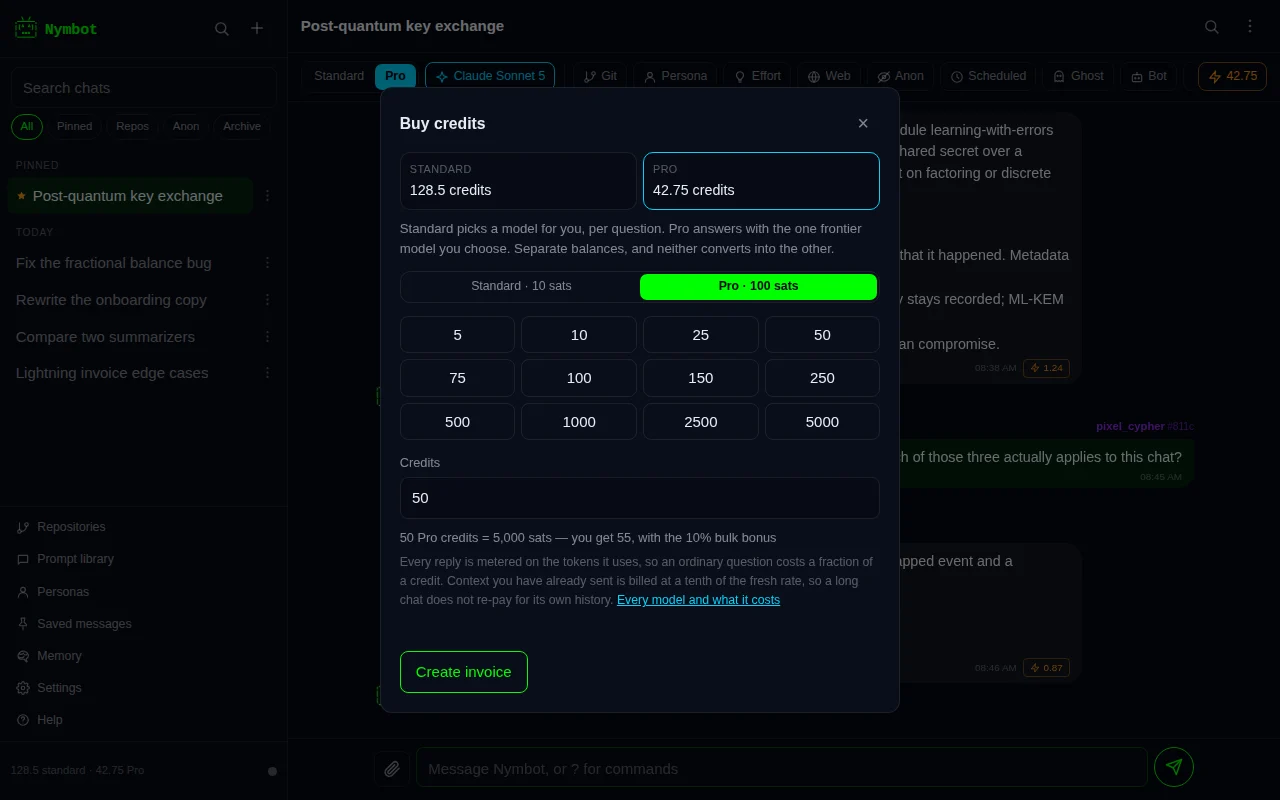
| Standard credits | 10 sats each | Auto-routed replies — the model is chosen per task |
| Pro credits | 100 sats each | Replies from a specific frontier model you have pinned |
They are separate and neither converts into the other. The Standard / Pro
switch in the toolbar decides which one the conversation is spending;
?balance shows both, and so does the credits sheet. In the web app the Buy chip
in the toolbar shows the one the conversation is spending.
The same two balances pay for the API: its auto-routed model spends standard credits and every other model spends Pro credits, at the same prices as the app.
Buying over Lightning
?buy, or the Buy button, opens a Lightning invoice with a
Standard/Pro switch. Pay it from any Lightning wallet — scan the QR, or copy the
invoice — and the balance updates within seconds of the payment settling.
The invoice is not addressed to you in any meaningful sense: it is a payment request, it carries no identity, and the credit it produces is attached to your public key by the ledger. Nothing about the purchase has to be true about you.
If the app closes between paying and crediting, the claim is idempotent — reopen it and the credit lands once, not twice.
What a reply costs
Standard replies are metered the same way, on the tokens the routed model actually reads and writes at its rates, and charged in thousandths of a credit — so an ordinary answer costs a fraction of one, and a long reasoning route or a search-backed answer costs more. Only a model with no published rates falls back to a flat one credit, or two for coding and reasoning.
Pro replies are metered on the tokens the model actually reads and writes, at that model's published per-million rates. A maximum is reserved when you send the message and only the real cost is charged, so a short answer from an expensive model costs a fraction of what the budget allowed for.
A reply is not a fixed price per message. Two things move it, and the second is the one that surprises people:
- How long the answer is. Output tokens are the expensive side — often five times the input rate — so a long answer can cost twice a short one from the same model.
- How much the model had to read. Everything in front of it is charged as input: your question, the conversation so far, and anything a tool pulled in. A web-backed answer that reads six pages, a repository task carrying file trees, or an attached document all cost more than the same question asked cold — sometimes several times more.
Conversation history you have already sent is billed at the cached rate, a tenth of the fresh one, so a long chat does not re-pay for itself — but it is not free either.
?model quotes each model as a range before you commit to one: the low end is a
short answer at a typical context, the high end a long one. A reply that reads a lot can land
above the range, which is why the app shows what every reply actually cost — tap the
price on any of them. Image and speech generation are charged
per generation instead.
A repository task can use up to six model calls for one message, each billed at the pinned model's price. Only the calls actually made are charged.
Server runs, research and Team mode
Some work is paid from your Pro balance but priced differently from a single reply:
- Server runs are billed for server time, in steps of 10 seconds, at what the server costs plus a margin, converted to Pro credits at the current Bitcoin price. A run is charged separately from any reply that asked for it.
- Deep research is metered on the tokens it uses across every step.
- Team mode is the metered total of the overseer and every worker.
In all three you see the most it can cost before it starts. That maximum is held from your Pro balance while the work runs, and only what was actually used is charged.
Spending caps
A chat can have two limits, in sats, set from Spending caps in its header menu:
- A total to stop at. Once the chat has spent that much, nothing more is sent from it until you raise the cap.
- A reply to ask about. Before sending, the app compares the most a reply could cost with this amount, and if it could cost more, asks first: send it anyway, raise the cap, or cancel.
Caps count both balances, each at its own price per credit, so they work the same whichever tier answers. The chat header and the chat's statistics show how much of the cap is used, and caps sync with the chat to your other devices.
A bot can carry caps too, for every chat that uses it. When a chat and its bot both have them, the stricter one applies.
The server enforces the cap as well. A reply is never charged more than the cap allows, and a repository task, research task or server run that would go past it stops instead. Work that carries on with nobody there to ask, such as a task continuing by itself or a scheduled prompt, stops rather than going over.
API keys have caps of their own, also in sats, which can reset daily, weekly or monthly — see API keys.
Every model and what it costs
The same sheet the app shows under ?model, read from the same catalog, so you
can check a price without opening anything. A range runs from a short answer to a long one at
a typical context; what you are charged is what the reply actually came to, which can sit
above the range when the model had to read a great deal.
A repository call is priced higher than a plain reply because each one carries the repository's file trees and everything read so far as input — see repository tasks.
Loading the model list…
Gifting and transferring
?giftopens Gift an amount: you give some of your credits as a link, a code and a QR code that anyone can redeem once. In Nymchat you can also tap someone's nym and choose Gift Nymbot Credits.?transfermoves your whole balance, standard and Pro, to another key. Useful when you rotate keys; irreversible once it lands.
Both are also under Identity in Settings, as Gift an amount… and Move my whole balance….
Gift an amount
- Pick Standard or Pro, then a preset or your own number. A gift is a whole number of credits: at least 10 standard credits or 1 Pro credit, and at most what you have free to give. Credits a reply is still using are not free until it finishes.
- Tap Make the gift and confirm. The credits leave your balance at once.
- You get a link, a code that starts with
GIFT-and a QR code. Copy or share whichever suits, and send it only to the person it is for: whoever uses it first gets the credits.
The person you send it to opens the link, or types ?gift followed by the link
or the code, or taps Redeem a gift… on the Gift an amount screen.
The app shows what the gift is before anything moves, and Add to my
balance adds the credits to the key they are signed in with. Standard credits
arrive as standard credits and Pro credits as Pro credits.
- A gift can be claimed once. A second attempt, from anyone, is refused.
- Your gifts, on the same screen, lists what you have made and whether it was claimed. Cancel gift on one nobody has claimed puts the credits back on your balance and the link and code stop working.
- A gift nobody claims within 30 days expires, and the credits go back to you by themselves.
- You cannot redeem your own gift; cancel it instead.
- Nymbot keeps only a fingerprint of the code, not the code itself. The app that made the gift keeps the code so Show can bring the link back up; on another device you can still see and cancel the gift, but not show its link again.
Moving your whole balance
?transfer takes no name typed after it in the app. It opens the transfer
screen, where you paste the other key as an npub or in hex and confirm before anything
moves.
Gifts and transfers both use your real nym's balance. Moving credits onto a throwaway key works differently and deliberately — as blind vouchers, so the move cannot be used to link the two.
If an API request cost more than the balance could pay, the rest is owed, and it is paid first out of the next credits that reach that balance. Until it is paid, that balance cannot pay for replies, gifts, transfers or vouchers.
When nothing is charged
You are charged for an answer, not an attempt.
- A generation that fails costs nothing, and so does a research task that fails.
- A server run that fails to start costs nothing, and one you decline never runs.
- A reply that never reaches you costs nothing — ask again and the turn is replayed, not regenerated. Resending the same message never buys a second answer.
- Local commands —
?help,?balance,?buy,?model,?git,?anon,?clear,?image models— are free. - Running out mid-conversation stops the reply before it is generated and tells you, so a low balance never produces a half answer you paid for.